¶ How To Setup Multi‑Factor Authentication (MFA) in Microsoft 365
¶ Summary
¶ Introduction
This tutorial will guide you through configuring Multi‑Factor Authentication (MFA) in the Microsoft 365 service (where the IPB students' email service is hosted).
¶ Why Use Multi‑Factor Authentication?
Multi‑Factor Authentication (MFA) adds an extra layer of security to your account by requiring more than just a password. This mechanism protects your account against unauthorized access, even if someone obtains your password. With MFA enabled, attackers would also need access to your authentication device (typically the smartphone), making your account significantly more secure.
Using this feature requires your personal smartphone to perform a second validation when accessing the account, through a TOTP (Time‑based One‑Time Password) mechanism.
¶ MFA Configuration
Execute the following steps sequentially:
- Log in to a browser with an IPB student account at https://mysignins.microsoft.com/security-info
- Click on "Add sign‑in method" and select the Microsoft Authenticator app
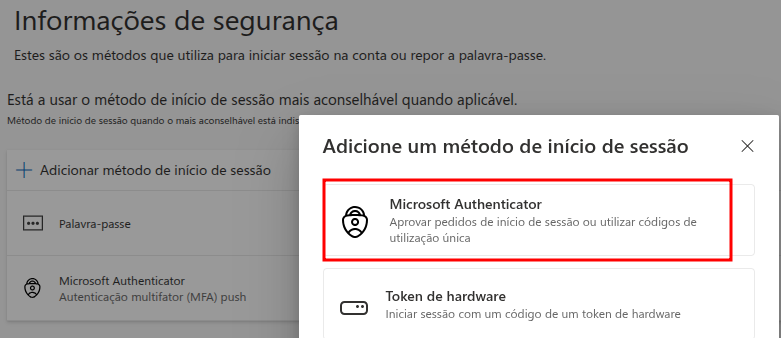
- Install the Microsoft Authenticator app on your personal smartphone if you haven't already (search for this name in the Android or iPhone/iOS app store, as applicable)
- Log in to the Microsoft Authenticator app (you can use the IPB student credentials; if you already have a personal Microsoft account configured in this app, you can use that same account)
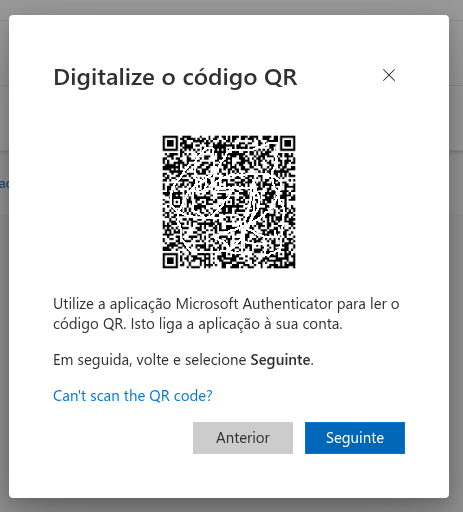
- In the app, scan the QR code displayed in the browser (from step 2)
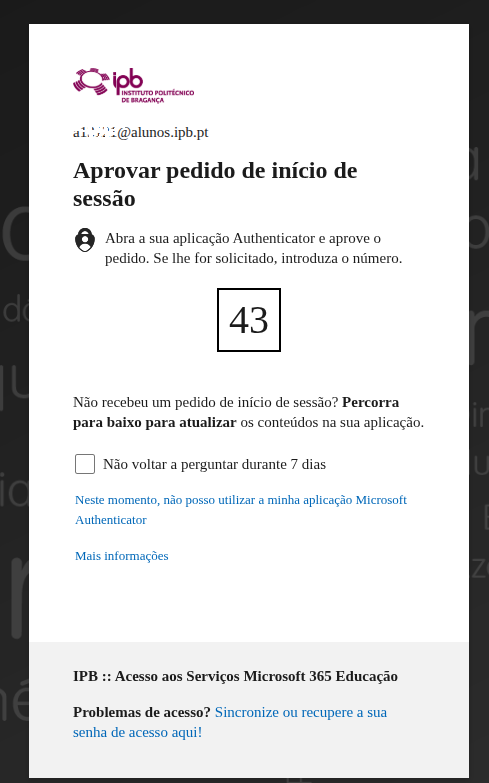
From this moment on, authentication to the IPB students' email service (webmail.alunos.ipb.pt) will require your identification (with the email/password pair) and subsequent validation in the Microsoft Authenticator app (see example in the following image).
IMPORTANT: Never delete the entry you just added in Microsoft Authenticator! If this happens, or if you no longer have access to the smartphone that had the authenticator, report the situation at https://suporte.ipb.pt or request support at your school's IT Center.
¶ Troubleshooting
In case of problems, report at: https://suporte.ipb.pt or request support at your school's IT Center.
The security of IPB’s electronic services depends on every link — including yours!
Stay Secure! 🔐